Create RFQ
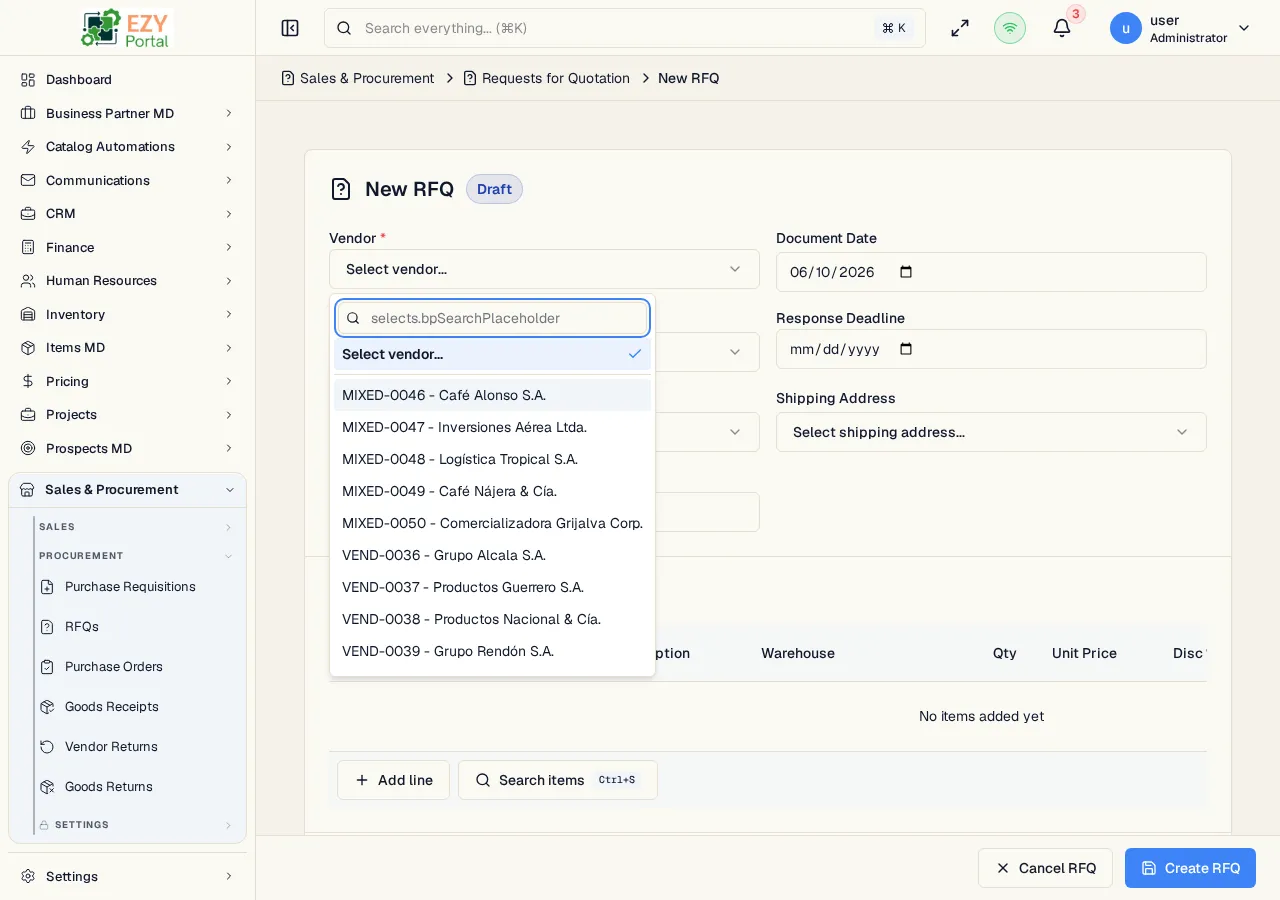
The Create RFQ page creates a new Request for Quotation in Draft status. It uses the full-page procurement document editor with a vendor header, editable purchasable line items, pricing, tax, source-document references, and document totals.
Accessing the Page
Section titled “Accessing the Page”From the Requests for Quotation list, click New RFQ, or navigate directly to /commerce/procurement/rfqs/new.
RFQs can also be created from an approved Purchase Requisition through the PR source dialog. Selected PR lines are copied into the new RFQ and remain tagged with their source PR and source quantity.
Form Overview
Section titled “Form Overview”| Section | Description |
|---|---|
| Document Header | Vendor, document date, contact, response deadline, addresses, currency, and reference |
| Line Items | Purchasable items, warehouses, quantities, unit prices, discounts, tax category, price after discount, and line totals |
| Footer | Payment terms, price list, optional buyer, remarks, and totals |
Header Fields
Section titled “Header Fields”| Field | Required | Description |
|---|---|---|
| Vendor | Yes | Active business partner with vendor role; vendor defaults can populate contact, addresses, payment terms, and price list |
| Document Date | Yes | RFQ document date |
| Contact | No | Vendor contact |
| Response Deadline | No | Date the vendor response is due; cannot be earlier than today or a future document date |
| Billing Address | No | Vendor billing address |
| Shipping Address | No | Destination/shipping address |
| Currency | No | Available when multi-currency is enabled |
| Reference | No | Internal or external reference |
Line Items
Section titled “Line Items”| Column | Required | Description |
|---|---|---|
| Item | Yes | Purchasable item selected by code or item search |
| Description | No | Line description |
| Warehouse | Yes | Receiving warehouse |
| Quantity | Yes | Must be greater than zero |
| Unit Price | Yes | Price from the selected price list, unless overridden |
| Disc % | No | Line discount percentage |
| Tax Category | Yes | Tax category applied to the line |
| Price After Disc. | Read-only | Unit price after discount |
| Line Total | Read-only | Line total including tax |
The item search sheet supports purchasable items, variants, and pack rows. Pack rows show the pack template badge and quantity hint. Lines copied from a PR show the source PR line badge and source quantity.
Validation and Pricing
Section titled “Validation and Pricing”- Vendor, Payment Terms, and Price List are required.
- Each line requires an item, warehouse, positive quantity, and tax category.
- Vendor changes can update defaults. Price list changes can update line pricing.
- If the selected price list is outside the user’s access scope, financial values are masked.
Save Behavior
Section titled “Save Behavior”| Action | Result |
|---|---|
| Create | Saves a Draft RFQ and redirects to RFQ Detail |
| Cancel | Returns to the Requests for Quotation list |
Related Pages
Section titled “Related Pages”- Requests for Quotation — List and manage RFQs
- RFQ Detail — Send, close, cancel, duplicate, or create a downstream PO
- Edit RFQ — Update a Draft RFQ
- Purchase Requisitions — Source PRs for RFQs
- Purchase Orders — POs created from sent RFQs