Converting a Prospect to a Business Partner
Qualified prospects can be converted into full Business Partners. The conversion is an asynchronous process — once initiated, the system creates a new Business Partner record, links it to the prospect, and updates the prospect status to Converted.
Accessing the Page
Section titled “Accessing the Page”Open this page from the Portal sidebar under its module section.
What Gets Created
Section titled “What Gets Created”When conversion succeeds, the system creates two records:
- Business Partner — a new BP with the Customer role and Active status. The BP code matches the prospect code (or a custom code if you provided one). The BP name comes from the company field if available, otherwise from the prospect’s full name.
- Primary Contact — linked to the new BP, carrying the prospect’s first name, last name, email, phone, and job title.
The two records are permanently linked. You can view the BP from the prospect detail page, and the original prospect from the BP detail page.
Automatic Retry
Section titled “Automatic Retry”If the conversion fails, the system automatically retries with increasing intervals. You can continue working while this happens. You can also retry manually at any time from the Conversion Status page.
Prerequisites
Section titled “Prerequisites”A prospect must have Qualified status before it can be converted. The status lifecycle is:
New → Contacted → Qualified → Converting → Converted
Quick status actions are available on the Prospect Detail page:
- Mark Contacted — changes New → Contacted
- Mark Qualified — changes Contacted → Qualified
Convert Dialog
Section titled “Convert Dialog”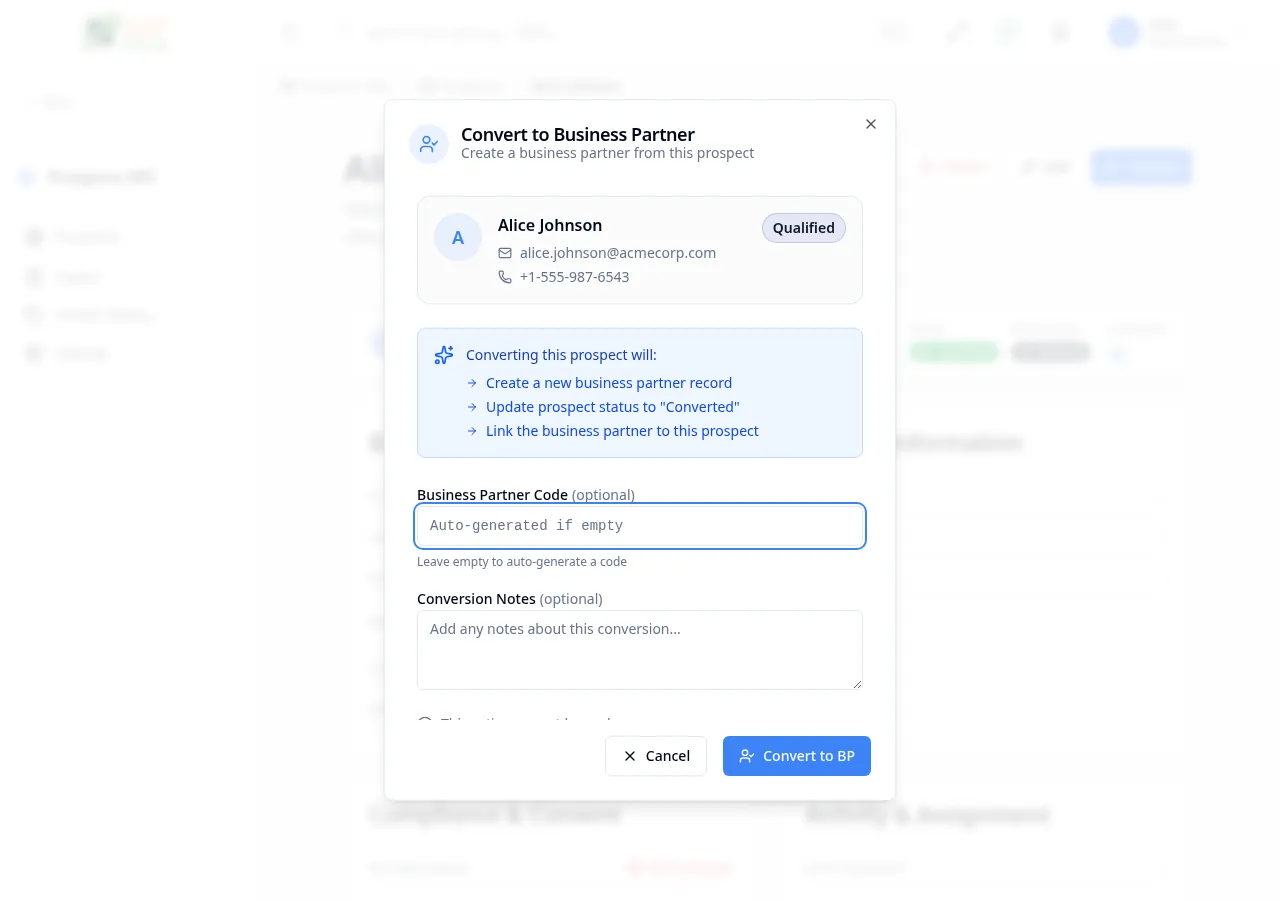
From a Qualified prospect’s detail page, click the Convert button. A dialog appears showing:
- Prospect summary — name, email, phone, company, and current status
- Conversion info — explains what happens: a new BP record is created, the prospect status is updated, and the records are linked
- Business Partner Code (optional) — enter a custom code or leave empty to auto-generate
- Conversion Notes (optional) — notes about the conversion
Click Convert to BP to start the conversion.
During Conversion
Section titled “During Conversion”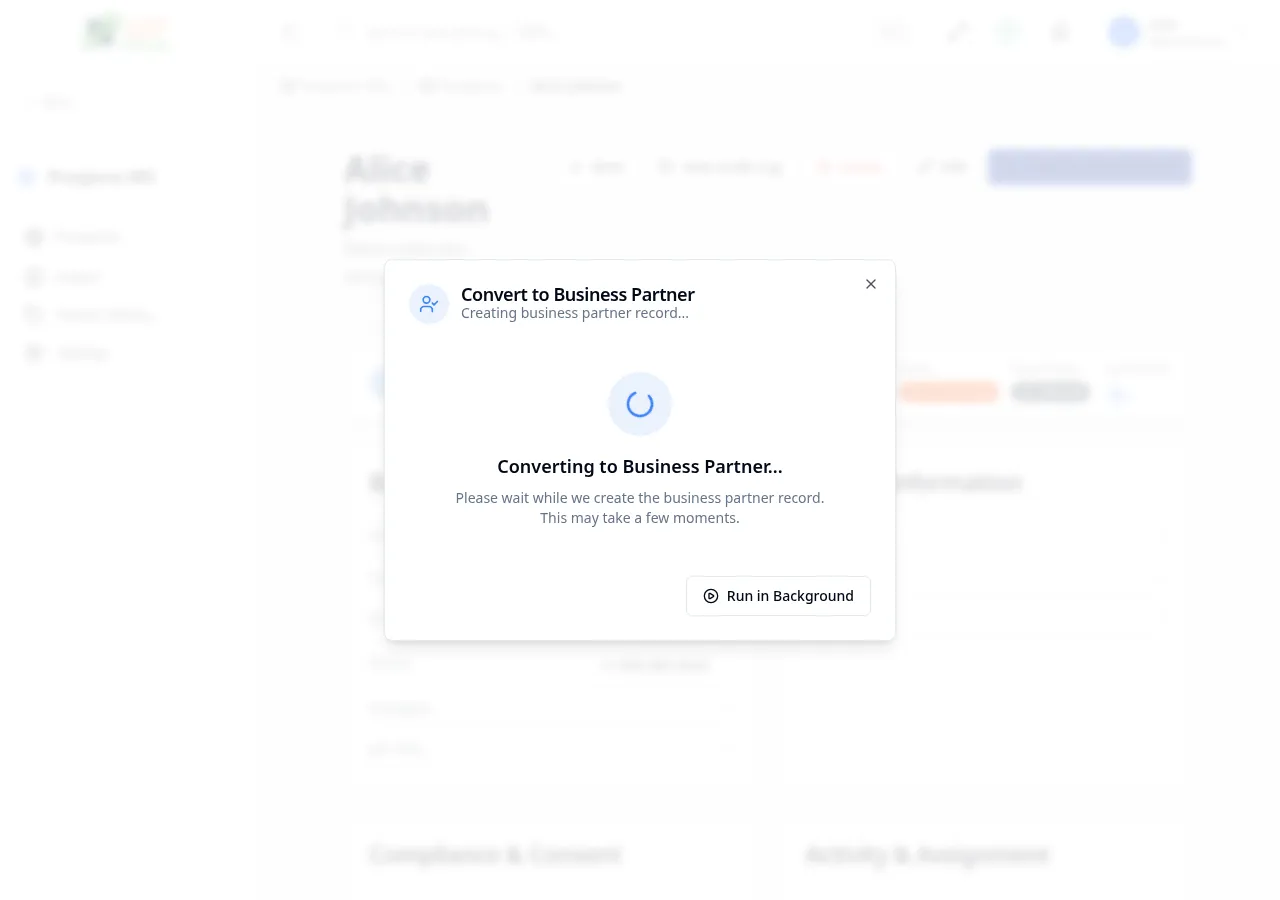
After clicking Convert to BP, the dialog shows a spinner while the system processes the conversion. You have two options:
- Wait — the dialog polls every 2 seconds and shows the result (success or failure)
- Run in Background — closes the dialog; conversion continues server-side and you receive a toast notification when complete
If you run in background, the prospect’s status changes to Converting and a View Conversion Status button appears on the detail page.
Conversion Complete
Section titled “Conversion Complete”When the conversion succeeds:
- The prospect status changes to Converted
- A new Business Partner is created and linked (visible via the View BP button)
- A success toast notification appears
Conversion Failed
Section titled “Conversion Failed”If the conversion fails:
- The dialog shows the error message
- A Retry button is available if the error is retryable
- You can also navigate to the conversion status page for full details
Conversion Status Page
Section titled “Conversion Status Page”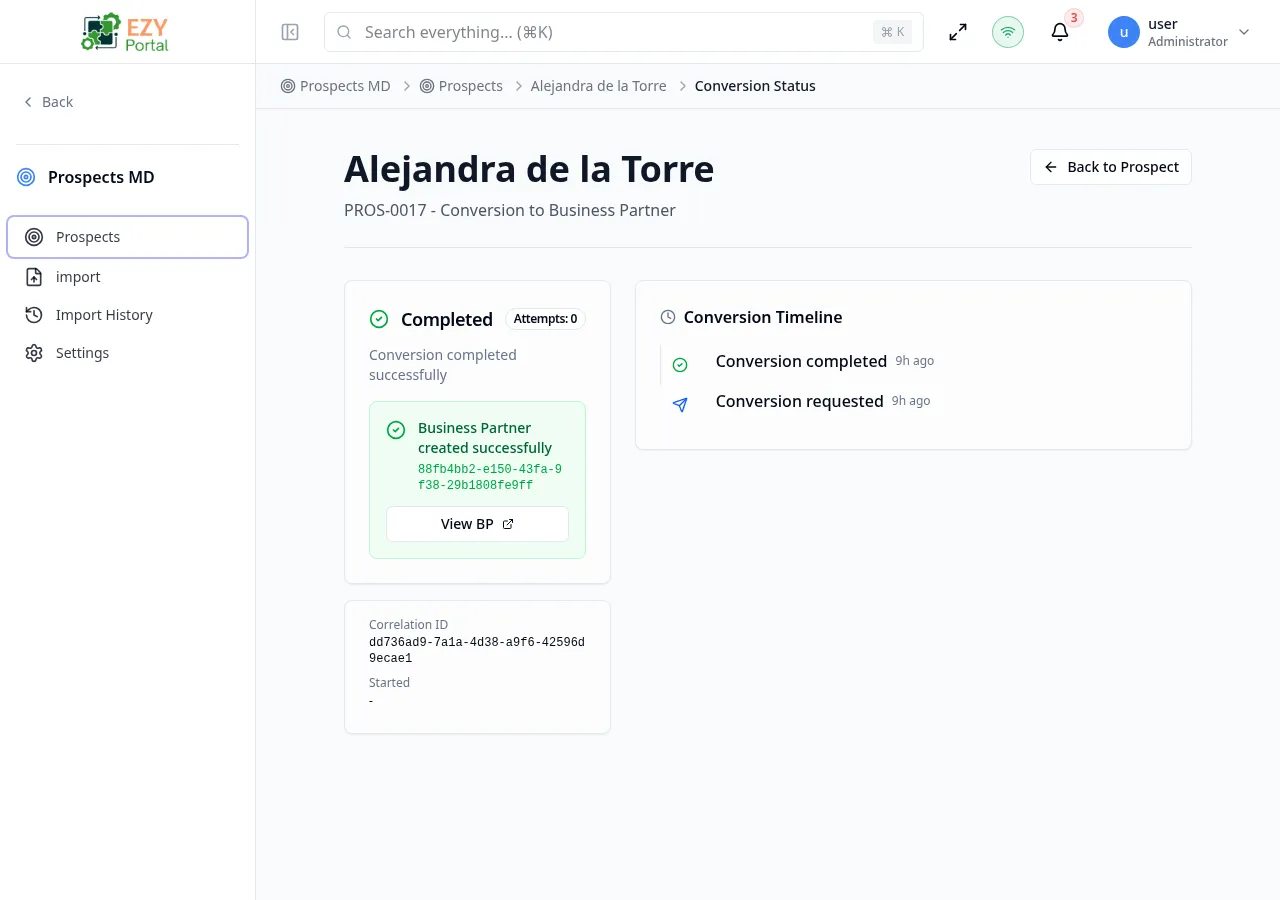
Accessed from the Prospect Detail page when status is Converting (click View Conversion Status), or by navigating to /prospects/:id/conversion-status.
Status Card
Section titled “Status Card”| State | Icon | Description |
|---|---|---|
| Pending | Clock (yellow) | Conversion initiated, waiting to start |
| Processing | Spinner (blue) | Actively creating the Business Partner record |
| Completed | Checkmark (green) | Business Partner created successfully — link to view the BP |
| Failed | X Circle (red) | Conversion failed — retry button if retryable |
Debug Information
Section titled “Debug Information”| Field | Description |
|---|---|
| Correlation ID | Unique tracking identifier for the conversion event |
| Started At | When the conversion was initiated |
| Last Retry At | Timestamp of most recent retry (if applicable) |
Conversion Timeline
Section titled “Conversion Timeline”A chronological audit log on the right side shows all conversion events:
- When the conversion was initiated
- Status transitions (Pending → Processing → Completed/Failed)
- Retry attempts and error details
Polling
Section titled “Polling”The page automatically polls for updates every 3 seconds. Polling stops when the status reaches Completed or Failed.
When a conversion fails and the retryable flag is true, click Retry to re-attempt. The retry count and timestamps are tracked in the timeline.
Actions
Section titled “Actions”| Action | Condition | Description |
|---|---|---|
| Back to Prospect | Always | Navigate back to the Prospect Detail page |
| View Business Partner | Completed | Navigate to the created Business Partner |
| Retry | Failed + retryable | Re-attempt the failed conversion |
Permissions & system behavior
Section titled “Permissions & system behavior”- Viewing this page requires access to the corresponding module.
- Create/edit/delete actions are visible only to users with matching permissions.
- After a successful action, the page updates list/detail data to reflect the change.
Related Pages
Section titled “Related Pages”- Prospect Detail — Return to the prospect
- Prospects List — Return to the list
- Edit Prospect — Change prospect status manually