Country Settings
The Countries tab controls which countries appear in address forms across the Business Partners module and optionally sets a default country.
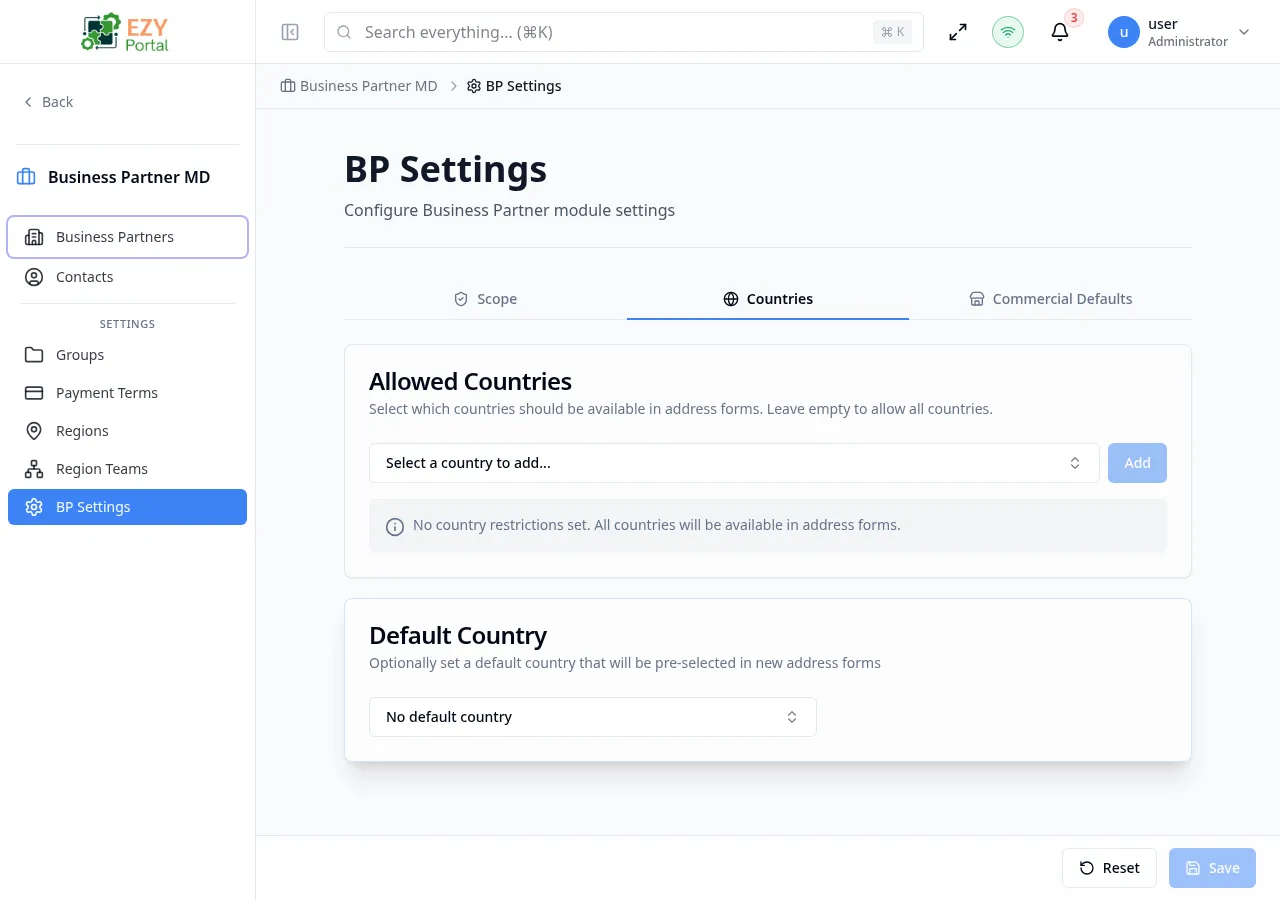
Accessing the Page
Section titled “Accessing the Page”Open this page from the Portal sidebar under its module section.
What you can do here
Section titled “What you can do here”- Add one or more allowed countries so that address forms only offer those countries as options.
- Remove a country from the allowed list; existing addresses using that country are not affected.
- Leave the allowed list empty to permit all countries in address forms.
- Set a default country that is pre-selected when a user opens a new address form.
- Clear the default country so no country is pre-filled.
Card 1: Allowed Countries
Section titled “Card 1: Allowed Countries”Select which countries should be available in address forms. Leave empty to allow all countries.
Adding a Country
Section titled “Adding a Country”- Use the country dropdown to search and select a country
- Click the Add button
- The country appears as a badge with its flag and name
Removing a Country
Section titled “Removing a Country”- Click the X icon on the country badge
- A confirmation dialog appears
Confirmation Dialog
Section titled “Confirmation Dialog”When removing a country that has existing addresses:
“There are 5 existing addresses using United States. Removing it will prevent creating new addresses with this country, but existing addresses won’t be affected.”
When no existing addresses use the country:
“Are you sure you want to remove United States from the allowed countries list?”
- Click Remove to confirm, or Cancel to abort
- If the removed country was set as the default, the default is also cleared
Empty State
Section titled “Empty State”When no countries are added, an info box shows:
“No country restrictions set. All countries will be available in address forms.”
Country Count
Section titled “Country Count”Below the badges, a count text shows the total: “5 countries selected”
Card 2: Default Country
Section titled “Card 2: Default Country”Optionally set a default country that will be pre-selected in new address forms.
| Field | Type | Description |
|---|---|---|
| Default Country | Dropdown | Select a country to pre-fill in new address forms |
| Clear button | X icon | Clears the current default (only visible when a default is set) |
- Placeholder: “No default country”
- Filtering: Only countries from the allowed list appear in the dropdown
- When no allowed countries are set, all countries are available
- Note: “Only countries from your allowed list can be set as default.”
Country settings apply to business partner address forms in create and edit workflows, helping keep address capture aligned with your tenant’s operational footprint.
Messages
Section titled “Messages”| Event | Message |
|---|---|
| Save success | ”Country settings saved successfully” |
| Save error | ”Failed to save country settings” |
| Load error | ”Failed to load country settings” |
Use Cases
Section titled “Use Cases”| Scenario | Allowed Countries | Default Country |
|---|---|---|
| US-only company | United States | United States |
| EU operations | EU member states | Company’s main country |
| Global operations | Leave empty (all) | Most common country |
Permissions & system behavior
Section titled “Permissions & system behavior”- Viewing this page requires access to the corresponding module.
- Create/edit/delete actions are visible only to users with matching permissions.
- After a successful action, the page updates list/detail data to reflect the change.
Related Pages
Section titled “Related Pages”- BP Settings — Back to settings overview
- Business Partner Create — Creating BPs with addresses