Contacts
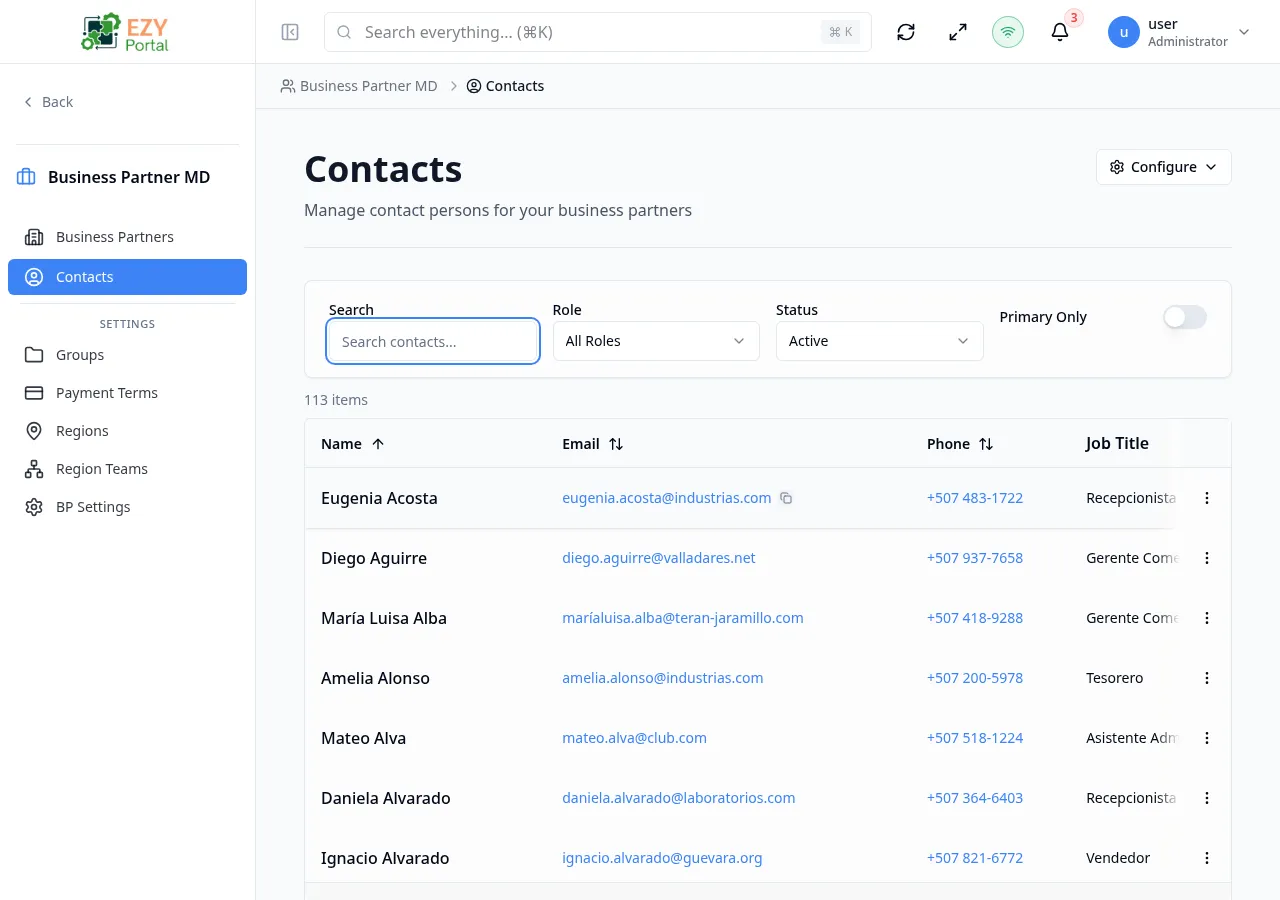
View and search contacts associated with your business partners.
Accessing the Page
Section titled “Accessing the Page”Navigate to Business Partners → Contacts in the sidebar, or go to /business-partners/contacts.
List Columns
Section titled “List Columns”The table supports 10 columns with configurable visibility. Click the Configure (gear) button to show or hide columns.
| Column | Default Visible | Sortable | Description |
|---|---|---|---|
| Name | Yes | Yes | Contact full name (always visible) |
| Yes | Yes | Contact email address | |
| Phone | Yes | Yes | Contact phone number |
| Job Title | Yes | Yes | Contact job title |
| Department | No | No | Contact department |
| Business Partner | Yes | Yes | Name of the associated business partner |
| Role | Yes | Yes | Functional role (Billing, Purchasing, Technical, Decision Maker, Logistics, Other) |
| Primary | Yes | Yes | Whether this is the primary contact for the business partner |
| Status | Yes | Yes | Active or inactive status badge |
| Created At | No | Yes | Creation date |
Filtering
Section titled “Filtering”| Filter | Type | Description |
|---|---|---|
| Search | Free text | Search by contact name, email, or keyword |
| Role | Dropdown | Filter by contact role |
| Status | Button group | Active, Inactive, or All |
| Primary Only | Toggle | Show only primary contacts |
| Department | Multi-select | Filter by department |
| Job Title | Multi-select | Filter by job title |
| Created At | Date range | Filter by creation date range |
When filters produce no results, an empty state displays with a Clear Filters option.
Sorting
Section titled “Sorting”Click any sortable column header to sort:
- First click — Ascending (A→Z, 0→9)
- Second click — Descending (Z→A, 9→0)
- Third click — Remove sort
Default sort: Name ascending.
Pagination
Section titled “Pagination”The list uses a Load More pattern:
- Page size: 10 records per load
- Load More button at the bottom loads the next batch
- Total count displays above the table
Actions
Section titled “Actions”Page Actions
Section titled “Page Actions”| Action | Description |
|---|---|
| Configure (gear) | Column visibility and filter layout configuration |
Row Actions
Section titled “Row Actions”Each contact row has a dropdown menu:
| Action | Permission | Description |
|---|---|---|
| Edit | canEditContact | Opens the edit dialog for the contact |
| Delete | canDeleteContact | Remove the contact after confirmation |
Click any row to open the Contact Detail page.
Role and Primary Rules
Section titled “Role and Primary Rules”- A contact has a functional role such as Billing, Purchasing, Technical, Decision Maker, Logistics, or Other.
- One contact can be marked as the primary contact for a business partner.
- Primary contacts are prioritized in contact listings to make key contacts easier to find.
Permissions & system behavior
Section titled “Permissions & system behavior”- Viewing this page requires access to the corresponding module.
- Create/edit/delete actions are visible only to users with matching permissions.
- After a successful action, the page updates list/detail data to reflect the change.
Related Pages
Section titled “Related Pages”- Contact Detail — View details of a specific contact
- Business Partners — Manage business partners and their contacts
- Groups — Organize business partners into groups