Flat File Connector
The Flat File connector writes transformed data to files on the server filesystem. It is a target-only connector — it receives records that have already been extracted, normalized, and transformed by the pipeline and writes them to disk in either CSV or XML format. Use it when the receiving system ingests data from files rather than a live API.
When to use this connector
Section titled “When to use this connector”- The receiving system picks up files from a shared folder or SFTP drop location.
- You need a local archive of every integration run for auditing or manual review.
- You are exporting data to a reporting or analytics tool that reads flat files.
- You want to stage output before loading it into a system that has no API connector.
Supported entity types
Section titled “Supported entity types”The Flat File connector accepts any entity type. Because it writes output without interpreting the record structure, it is compatible with every entity type that the platform supports. The entity type is reflected in the default filename when no custom pattern is set.
| Entity type | Friendly name | Notes |
|---|---|---|
item | Item / Product | |
bp | Business Partner | |
customer | Customer | |
bpgroup | Business Partner Group | |
paymentterms | Payment Terms | |
itemgroup | Item Group | |
pricelist | Price List | |
warehouse | Warehouse | |
taxgroup | Tax Group | |
uomgroup | Unit of Measure Group | |
fiscalperiod | Fiscal Period | |
salesquotation | Sales Quotation | |
salesorder | Sales Order | |
order | Order | |
booking | Booking | |
subscription | Subscription | |
service | Service | |
plan | Plan | |
menuitem | Menu Item |
See Entity Types for descriptions of each type.
Prerequisites
Section titled “Prerequisites”Before creating a connection profile for the Flat File connector:
- The output directory must exist and be writable by the EZY Integrations service process.
- If multiple jobs will write to the same directory at the same time, each job’s connection profile should use a filename pattern that includes
{correlationId}to avoid file collisions. - There is no external system to authenticate against — credentials consist only of path and format settings.
Connection profile fields
Section titled “Connection profile fields”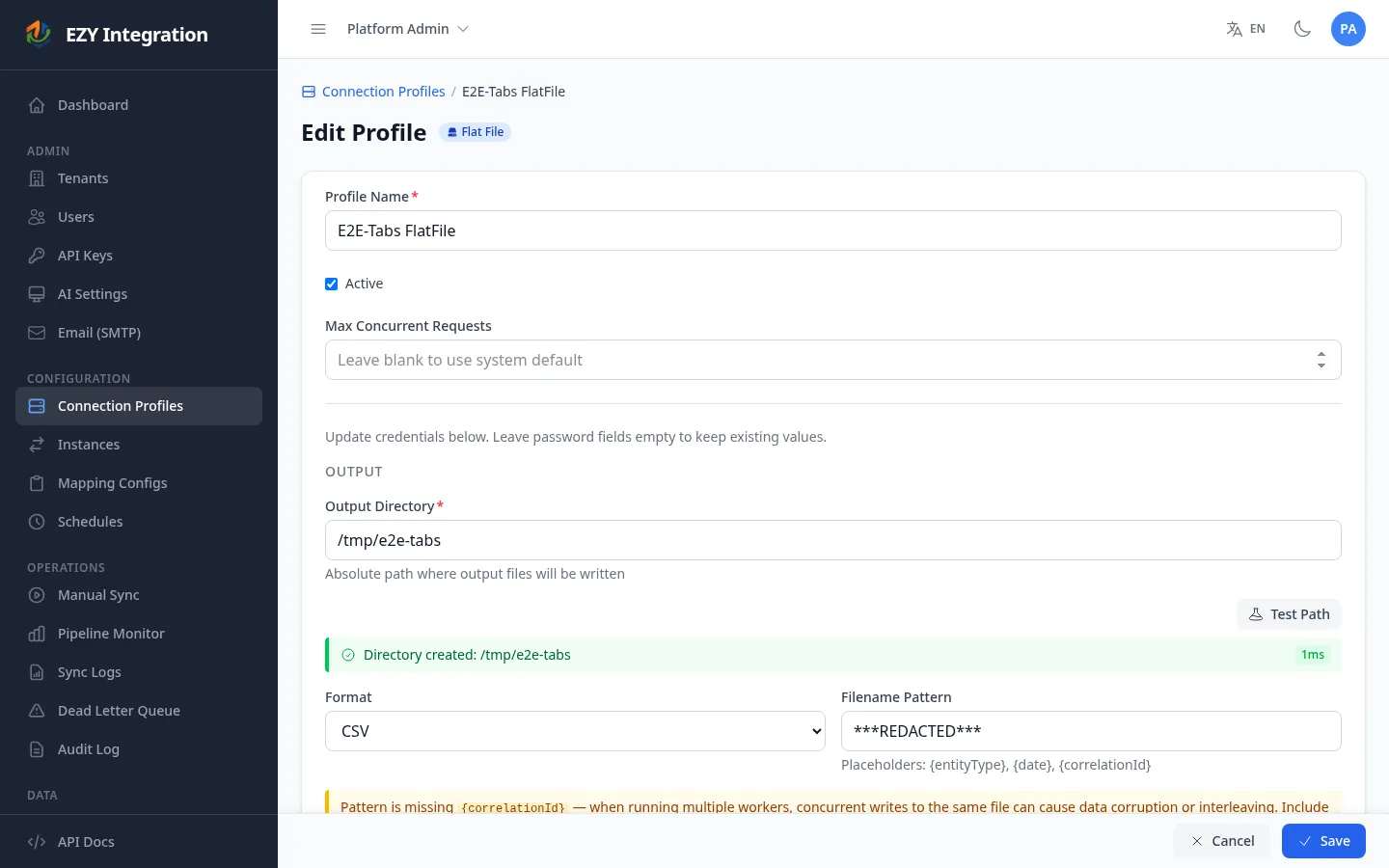
| Field | Required | Description | Example value |
|---|---|---|---|
| Output directory | Yes | Absolute path on the server where output files are written. The directory must be accessible to the integration service. | /var/integrations/output |
| Format | Yes | File format for output. Choose CSV or XML. Defaults to CSV if not set. | csv |
| Filename pattern | No | Template for the output filename. Supports the tokens listed below. When left blank, the default pattern {entityType}_{correlationId}_{date} is used. | orders_{date}_{correlationId} |
Filename pattern tokens
Section titled “Filename pattern tokens”| Token | Replaced with | Example output |
|---|---|---|
{entityType} | The entity type of the records in the run. | item |
{date} | Current UTC date in yyyy-MM-dd format. | 2025-03-15 |
{correlationId} | First eight characters of the run’s correlation identifier. | a1b2c3d4 |
If the filename pattern does not include a file extension, the connector appends .csv or .xml automatically based on the Format field.
File format details
Section titled “File format details”Each job run appends rows to the output file. If the file does not exist when the run starts, the connector creates it and writes a header row first. Column names are derived from the transformed payload fields, using dot notation for nested structures (for example, address.city). Fields that contain commas, double quotes, or newlines are quoted automatically.
Each job run appends a new <item> element inside the <items> root element. If the file does not exist when the run starts, the connector creates it with a valid XML declaration and a <items> wrapper. Nested JSON objects become nested XML elements; arrays become repeated <element> children. JSON field names that are not valid XML element names are sanitized automatically (leading digits are prefixed with _; special characters are replaced with _).
Known limitations
Section titled “Known limitations”- Target-only. The Flat File connector cannot be used as a source — it has no extractor. It always appears on the target side of a job.
- File collision risk. If a filename pattern is set but does not include
{correlationId}, two job runs that execute at the same time will write to the same file path. The connector will serialize access within a single process, but if multiple integration service instances are running they may conflict. The UI displays a warning when this condition is detected. - No delivery confirmation. The connector has no way to confirm that the receiving system has picked up the file. Monitoring for file consumption is the responsibility of the downstream process.
- Append-only. Both CSV and XML output is appended on every run. The connector does not overwrite or truncate existing files. If you need a fresh file per run, include
{correlationId}or{date}in the filename pattern. - Server-side path only. The output directory must be accessible from the server running EZY Integrations. Remote network shares must be mounted at the server level.
Related
Section titled “Related”- Entity Types — Full list of supported entity types.
- Architecture Overview — How the Flat File connector fits into the pipeline as a target.
- Jobs Overview — How to configure a job that uses this connector as a target.
- Connectors Overview — Compare all available connectors.