Create Purchase Order
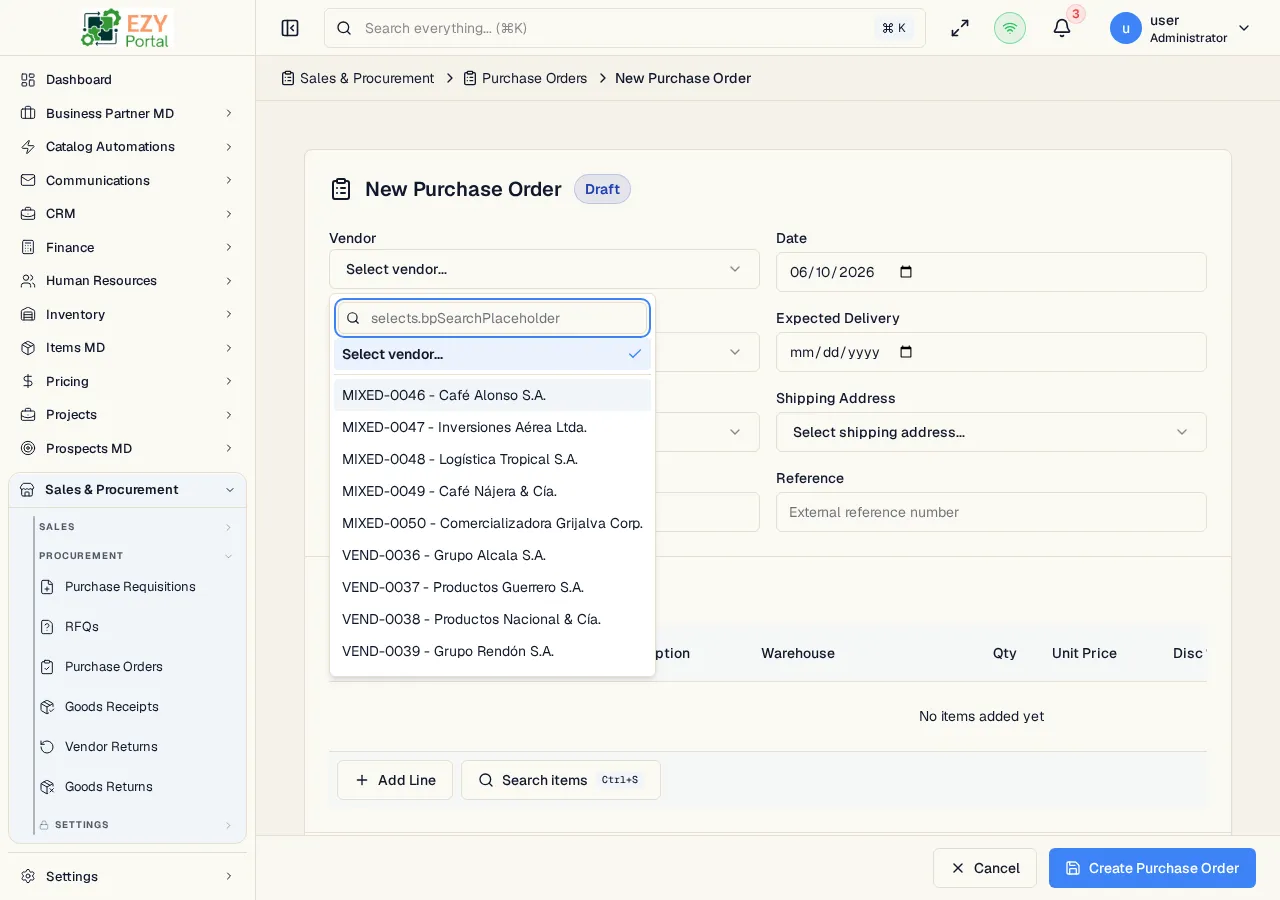
The Create Purchase Order page creates a new PO in Draft status. It uses the full-page document editor with a vendor header, editable line-item grid, item search, pricing, tax, and document totals.
Accessing the Page
Section titled “Accessing the Page”From the Purchase Orders list, click New Purchase Order, or navigate directly to /commerce/procurement/orders/new.
Purchase Orders can also be created from source documents:
| Source | Entry point | Result |
|---|---|---|
| Approved Purchase Requisition | PR detail/source dialog | Copies selected open lines into a new PO |
| Sent RFQ | RFQ detail/source dialog | Copies selected RFQ lines into a new PO |
Form Overview
Section titled “Form Overview”| Section | Description |
|---|---|
| Document Header | Vendor, document date, contact, expected delivery, addresses, vendor reference, and external reference |
| Line Items | Purchasable items, warehouses, quantities, pricing, discounts, tax category, and line totals |
| Footer | Payment terms, price list, optional buyer, remarks, and totals |
Header Fields
Section titled “Header Fields”| Field | Required | Description |
|---|---|---|
| Vendor | Yes | Active business partner with vendor role; vendor defaults populate payment terms, price list, contact, and addresses |
| Document Date | Yes | PO document date |
| Contact | No | Vendor contact |
| Expected Delivery | No | Expected goods receipt date |
| Billing Address | No | Vendor billing address |
| Shipping Address | No | Destination/shipping address |
| Vendor Ref # | No | Vendor’s reference number |
| Reference | No | Internal or external reference |
Line Items
Section titled “Line Items”| Column | Required | Description |
|---|---|---|
| Item | Yes | Purchasable item selected by code or item search |
| Description | No | Line description |
| Warehouse | Yes | Receiving warehouse |
| Quantity | Yes | Must be greater than zero |
| Unit Price | Yes | Price from the selected price list, unless overridden |
| Disc % | No | Line discount percentage |
| Tax Category | Yes | Tax category applied to the line |
| Price After Disc. | Read-only | Unit price after discount |
| Line Total | Read-only | Line total including tax |
The item search sheet supports purchasable items and purchase-order pack rows. Pack rows show the pack template badge and can expand to show pack contents.
Validation and Pricing
Section titled “Validation and Pricing”- Payment Terms and Price List are required.
- Each line requires an item, warehouse, positive quantity, and tax category.
- Vendor changes can update defaults. In edit mode, changing the vendor or price list can prompt before updating existing line prices.
- If the selected price list is outside the user’s access scope, financial values are masked.
Save Behavior
Section titled “Save Behavior”| Action | Result |
|---|---|
| Create | Saves a Draft PO and redirects to Purchase Order Detail |
| Cancel | Returns to the Purchase Orders list |
Related Pages
Section titled “Related Pages”- Purchase Orders — List and manage POs
- Purchase Order Detail — Confirm, close, cancel, duplicate, or create downstream documents
- Edit Purchase Order — Update a Draft PO
- Purchase Requisitions — Source PRs for POs
- Requests for Quotation — Source RFQs for POs